
Going with friends
A handful of people you already know. You invite them, and you plan it together.
- Invite each person by email
- Everyone can help edit the plan
- The trip stays private

Publish one trip page your members join themselves. They vote on the dates and see the cost each, and you run it with your co-organisers.
Share one trip page. Members join themselves, so there’s no list of emails to chase.
Members who join vote in a date poll, and the winner becomes the trip’s dates.
The per-person estimate updates as people join, so nobody has to ask twice.
Make your co-organisers editors. Members see the plan but can’t change it.
Both use the same planner. What changes is how people get on the trip and who runs it.
A handful of people you already know. You invite them, and you plan it together.
A club, society or community, where you don’t want to add every member by hand.
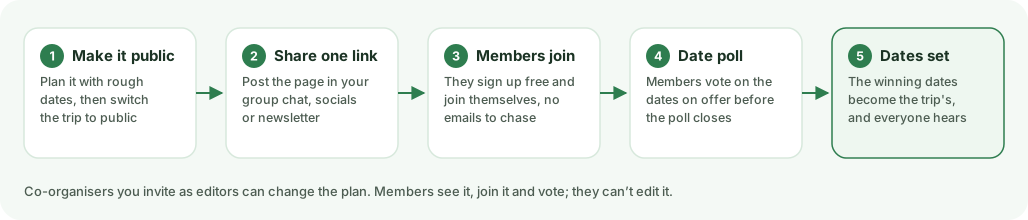
Three steps, and your members do most of the last one.
Start with a rough time, like “sometime in June”, and switch the trip to public. It gets its own page with the plan, and it can turn up in Explore.
Post the page in your group chat, newsletter or socials. Members join with a free account. Invite your co-organisers as editors.
Open a date poll. Visitors see the dates on offer before they join, and members vote. When it closes, the dates are set and everyone hears.
Add each cost as it comes up: split across the group, like the huts, or the same for everyone, like a ticket. Everyone on the trip sees the total and roughly what it comes to each.
Everyone on the trip gets the same plan, list and dates, kept up to date for them.
Add what to bring. Members tick off their own boots and waterproofs, and claim shared kit like the stove or first-aid bag, so you can see who has it.
Members can subscribe to their trips in Google, Apple or Outlook Calendar. When the poll sets the dates or the plan moves, their calendar follows.
Each day of the trip shows the weather as it gets close, on the public page too, so nobody asks whether it’s still on.
Public trips appear in Explore, with the days, map and travel times worked out. Someone searching for a weekend away can find your club’s trip and join it before it starts.
Turn on a public page at be-outside.app/@yourname. It lists your upcoming and past trips, and members can follow it to hear by email or in the app when you post a new one. Pin it in your bio or your group chat.
No. Joining a trip is free. Everyone you invite can see the plan and vote on dates, and anyone you give edit access can help shape it. There’s no limit on how many people you invite, on any plan.
No. An invitation arrives by email, a public trip’s link opens in the browser, and everything works there on a phone or a laptop.
Yes. People sign in to join a trip or vote on its dates, so only people on the trip take part. Anyone can read a public trip’s plan without one. Accounts are free and for over-18s.
Leave the trip’s dates flexible, then ask the group. Everyone ticks the start days that work for them or suggests their own. When voting closes, the most popular day becomes the trip’s dates and everyone gets an email. If it’s a tie, you choose.
Yes, if the trip is public. Share its page and anyone can join before the trip starts, including while the dates are still being picked. People who join can view the plan and vote on dates; to let someone edit, invite them.
Yes. While a date poll is open, the trip’s page shows the dates on offer and how many votes each has, but never who voted. Joining lets them vote.
Yes. Turn on your organiser page from your profile and you get one link, be-outside.app/@yourname, listing your public group trips. Members can follow it and hear by email or in the app when you post a new group trip. Mark a trip as a group trip when you create it or in its settings; your personal trips never appear on the page. It only ever shows public trips, and counts the people on them without naming anyone.
The plan, the cost each and the dates as they’re set. There’s a kit list they tick off themselves, where one person can claim shared kit like a stove, and they can add their trips to Google, Apple or Outlook Calendar so date changes reach them without a message from you.
Add each cost as shared across the group, like a cabin or fuel, or as the same price per person, like an entry ticket. Be Outside adds it up and shows roughly what the trip comes to each. Paying each other back happens outside the app.
No. Planning by hand, inviting people, the date poll, shared costs, the kit list and your organiser page are all free. Plus adds AI-assisted planning and days ordered by real travel time.Compare plans
Publish the trip, share one link and let your members pick the dates.
We’d like to use analytics cookies to see which parts of Be Outside get used, and cookies that let our support chat remember your conversation. They’re optional — the rest of the site works the same if you say no. How we use cookies